Reconnaissance

Reconnaissance Team
Section titled “Reconnaissance Team”- Recon Spotter - Leader of the Recon Team and spotter for the Sniper. Equipped with a long-range Radio and responsible for the communication with other Elements.
- Recon Sniper - Marksman of the Recon Team equipped with a long-range precision rifle.
- Other Recon Roles - In some cases the Recon Team may get expanded and additional team members will be added to perform other roles.
Tasks & Responsibilities
Section titled “Tasks & Responsibilities”- Reconnaissance - The Recon Team usually is operating ahead of the other ground teams. Gathering as much intel about enemy positions and movements as possible prior to the arrival of the main ground force. Infiltrating behind enemy lines. They are the eyes and ears of the ground command based on which decisions are made.
- Overwatch - Overwatch and cover the advance of ground teams while being on standby to eliminate threats.
- Direct Target Elimination - Directly engaging high-value targets. Including high threats for other units e.g. AA-Launchers prior to the arrival of Aviation Elements.
- Indirect Target Elimination - Coordinating with other Support Elements e.g. Aviation and guiding their efforts to engage and eliminate targets. Providing important information and guidance assisting with target acquisition and damage assessment.
Guidelines
Section titled “Guidelines”- Stealth - Stealth is key. The Recon Team should operate without getting detected. Avoiding enemy contacts in order to proceed further behind enemy lines. This may require even total silence of the team members.
- Avoid skylining, always have a background where you blend in.
- Avoid hasty movements. Moving individuals are easier to spot, especially when moving fast.
- After an engagement relocate yourself.
- Communication - Gathered information needs to be efficiently communicated to other Elements. This is done using both markers and short audio messages.
- Precision - When cleared to engage a target, precision is key. Other than self-defence, mission-specific ROE will handle how and when to engage.
- Survival - Due to operating behind enemy lines the Recon Team will most likely not receive any direct support by other units. Therefore they need to break contact whenever there is a threat of them being stuck. Transition between slow-paced stealth movements and quickly breaking contact is required.
Sniper Weapon Switching
Section titled “Sniper Weapon Switching”The Recon Sniper may carry two primary weapons. A Personal Defence Weapon (PDW) and a Sniper Rifle.
- Gunbag - The Sniper Rifle is by default loaded into his Gunbag (Backpack). He is carrying his PDW.
- Switching Weapons - Place the PDW into your inventory. Use ACE Self-Interaction to take the Sniper Rifle out of your Gunbag. When done, place the Sniper Rifle in your Gunbag with ACE Self-Interaction and take the PDW out of your inventory. It is not possible to switch a weapon you carry directly with the weapon in the Gunbag.
Marksmanship
Section titled “Marksmanship”Accuracy is vital when engaging targets, especially at range. When breaking stealth to engage a target, it should be precise and quick. Sniper and Spotter need to work together in order to produce accurate shots.
Influencing Factors
Section titled “Influencing Factors”- Temperature & Humidity - Lower Temperatures cause more drag due to higher air density slowing down the bullet. High Humidity reduces the drag.
- Barometric Pressure - Describes the density of air. Higher Pressure results in more drag.
- Range - Direct distance to Target.
- Direct wind - Headwinds and Tailwinds.
- Headwinds: Bullet gets slowed down which increases drop.
- Tailwinds: Bullet gets carried by the wind and arrives quicker, therefore less drop.
- Crosswind - Deviates the bullet to the side.
Calculations & Scope Adjustments
Section titled “Calculations & Scope Adjustments”In order to make adjustments you first need to get the required parameters.
- Vector 21 - Used to get the direct distance to target (more)
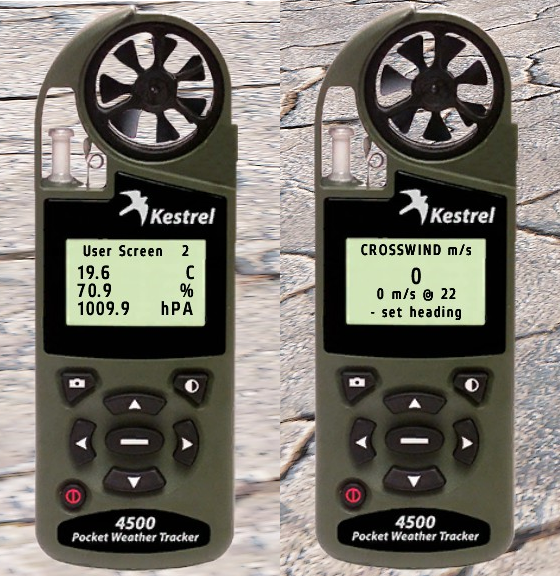
- Kestrel 4500 - Weather & Environment Meter.
- Atmospheric Data: User Screen 2
- Temperature
- Humidity
- Barometric Pressure
- Crosswinds
- Crosswind
- Set the heading to the target direction. Either by auto set by pointing at the target or by manual set.
- Point the Kestrel towards the wind direction. Read the crosswind value.
- If the wind direction is from left to right relative to your target location you need to make a negative horizontal adjustment and if the wind direction is from the right make a positive horizontal adjustment.
- Headwind / Tailwind
- When using the Crosswind function, point the Kestrel at the target. Read off the wind towards target direction. If the wind is coming from a direction behind you, it is Tailwind, when it comes from the front it is Headwind.
- Crosswind
- Atmospheric Data: User Screen 2
- Range card - Lists Bullet Drop at certain ranges. Furthermore, it lists Crosswind Adjustments and Target Lead Adjustments.
- Use all previously gained data to read the appropriate values out of the Range card.
- It is recommended to start with the vertical adjustment (range).
